
Make room for a brighter day.
Spa, massage and service bookings in Malaysia. Connect therapist schedules, client records and receipts in one clear workspace, from the first appointment to the next visit.
 Be present for every client.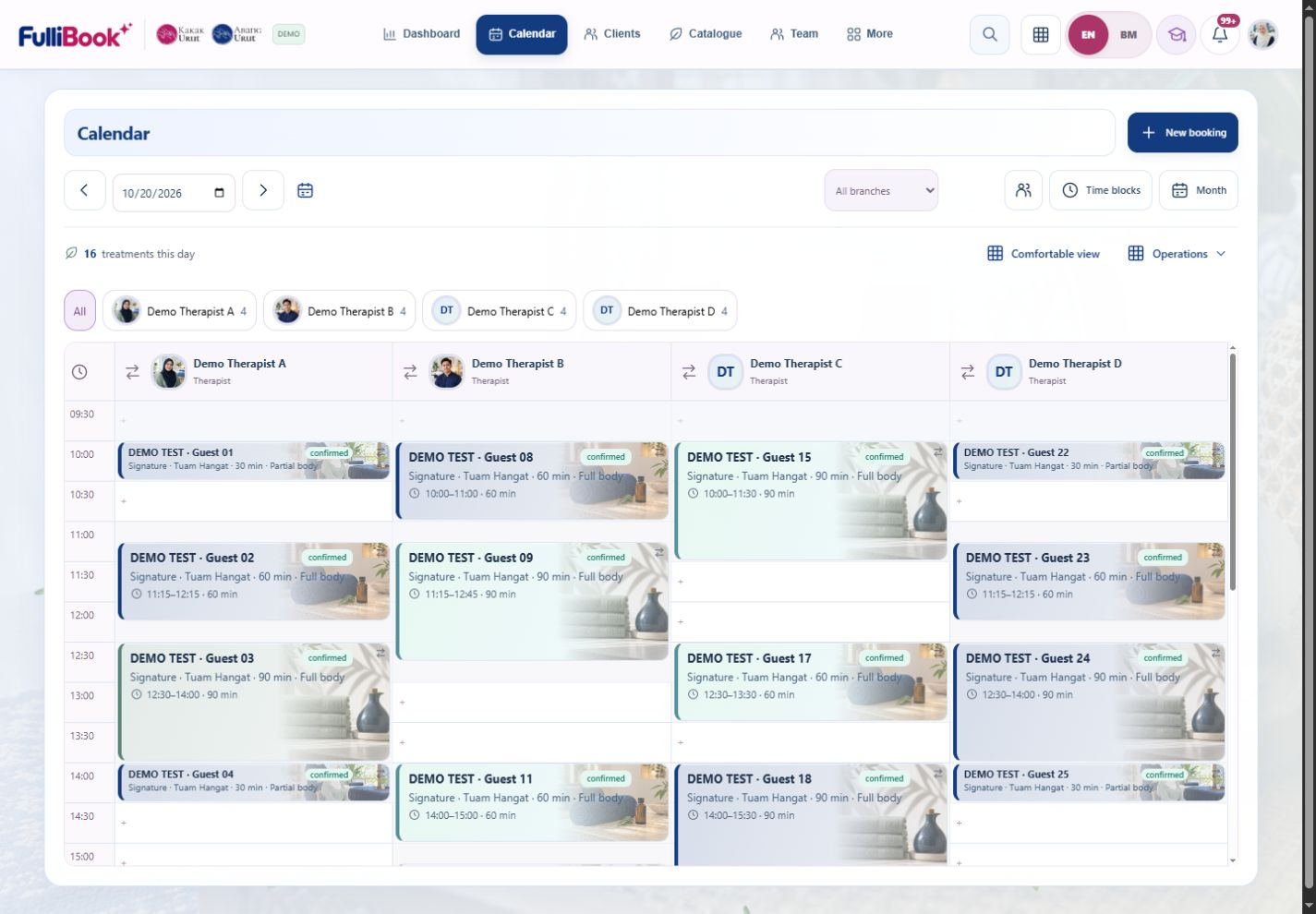
See who is arriving and when.
Work and access that follow each role.
Open the figures and their records.
Explore the actual interface. Clear tools for your bookings, catalogue, customers and orders, with access that follows each role.
See provider lanes, service times and booking details together. A top menu, optional sidebar and simple phone agenda keep the day in view.
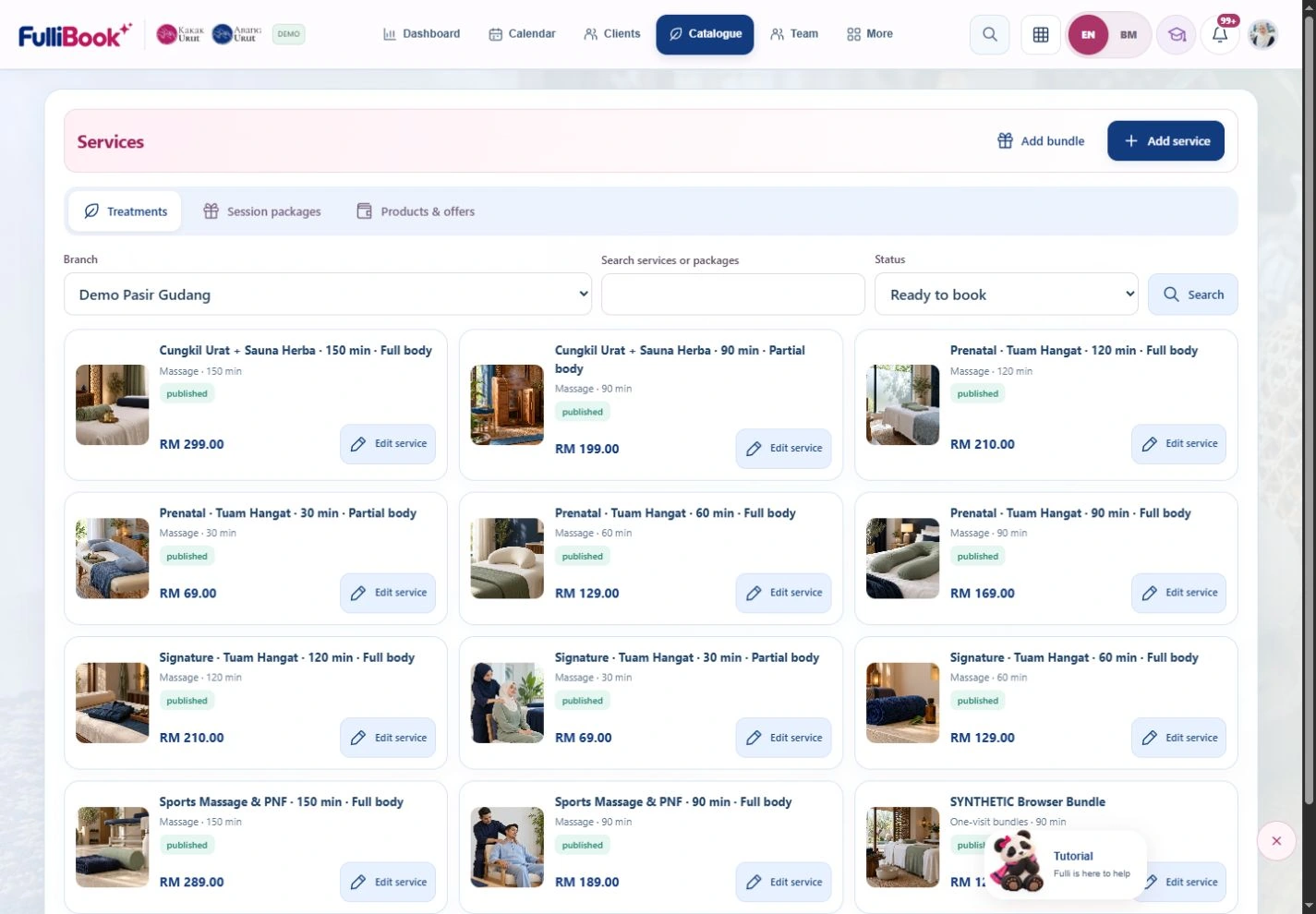
Bring treatment variants, one-visit bundles, session packages and retail into a clear catalogue, with branch availability and service photos.
Search client records, find retained orders and session balances, and see where each customer is in their visit journey.

Review orders, payment states and issued receipt paths in the workspace. Financial values shown here are synthetic demo records.

A service appointment scheduling solution for teams of different sizes.
Team, services and available times, together.
A clear plan for every person and service.
Received, outstanding and receipts, easy to find.
Keep assigned notes and follow-up within reach.
 People at the heart of it.
Each person sees the work they need. Your daily calendar stays simple, with business tools close by.
Move from the day's appointments to your company dashboard. Review verified collections, future confirmed visits and branch progress with clear data definitions.
 Actual Company Dashboard · Example records · Expand ↗
Search permitted pages, tools, clients and booking references from one workspace control.
Start with the top menu, or switch to the sidebar. Your own display preference is remembered.
Collections, forecast visits and issued receipts keep their own meaning and history.

Dashboard, catalogue, team and permitted company records.
Branch schedules, team operations and approved branch tools.
Clients, bookings, tasks and your own sales activity.
Orders, received payments and retained receipts.
Assigned appointments, private treatment notes, tasks and own leave.
Company accounts, plans, billing records and platform health.
Clear handoffs. Access follows each role and branch; platform tools do not grant clinical access.
From a wellness room to a salon chair, give every appointment a place in your day.
Explore business discovery →
Find the details that matter to your next step.
Ask FulliBook supportIt also suits appointment-based salons, barbers, beauty teams and pet grooming. Each business configures its own catalogue, team and availability.
Open FulliBook in a browser on desktop, tablet or phone. Your available tools follow your account and branch.
Ask FulliBook support for a guided walkthrough. Staff sign in using the access assigned by their company.
Discuss your business and required access with FulliBook support. Your current access and approved subscription records are available to your Company Admin.
Yes. The payer and named treatment recipients are separate. Each service still needs an eligible provider, available time and any required room or equipment.
Review the order total and record only money actually received. For the Kakak Urut configuration, the deposit is RM50 per person and is included in the bill. Low-value cases require policy review.
No. A payment-method label is not a connected gateway. Merchant setup, verified callbacks and real receipt checks are separate. Online checkout is offered only when the company connection is active. Reminder delivery has separate settings.
A one-visit bundle schedules its treatment components together. A session package retains purchased service sessions and their expiry for future bookings.
Access follows role, branch and explicit permissions. Private treatment notes, company finance and platform administration have separate server-side guards.
Reviewed CSV imports offer preview, mapping and duplicate checks. Confirm actual source files and totals before import; imported history is not a new payment or appointment.
Protected forms ask whether to keep editing or discard the draft before leaving. Reopen saved records to confirm the latest accepted version.
Use the WhatsApp support button for platform enquiries. Existing users can also open an internal Support case through their Company Admin. Do not share passwords or private clinical details.
No matching questions. Try another word or ask support.
For customers choosing a treatment and teams organising the next visit.
Jadual jelas. Kaunter lebih tenang.
Pelanggan kembali. Baki sesi tetap jelas.
Less chasing. More time for your clients.
Tempah urutan dengan butiran yang jelas.
Make room for a brighter day.